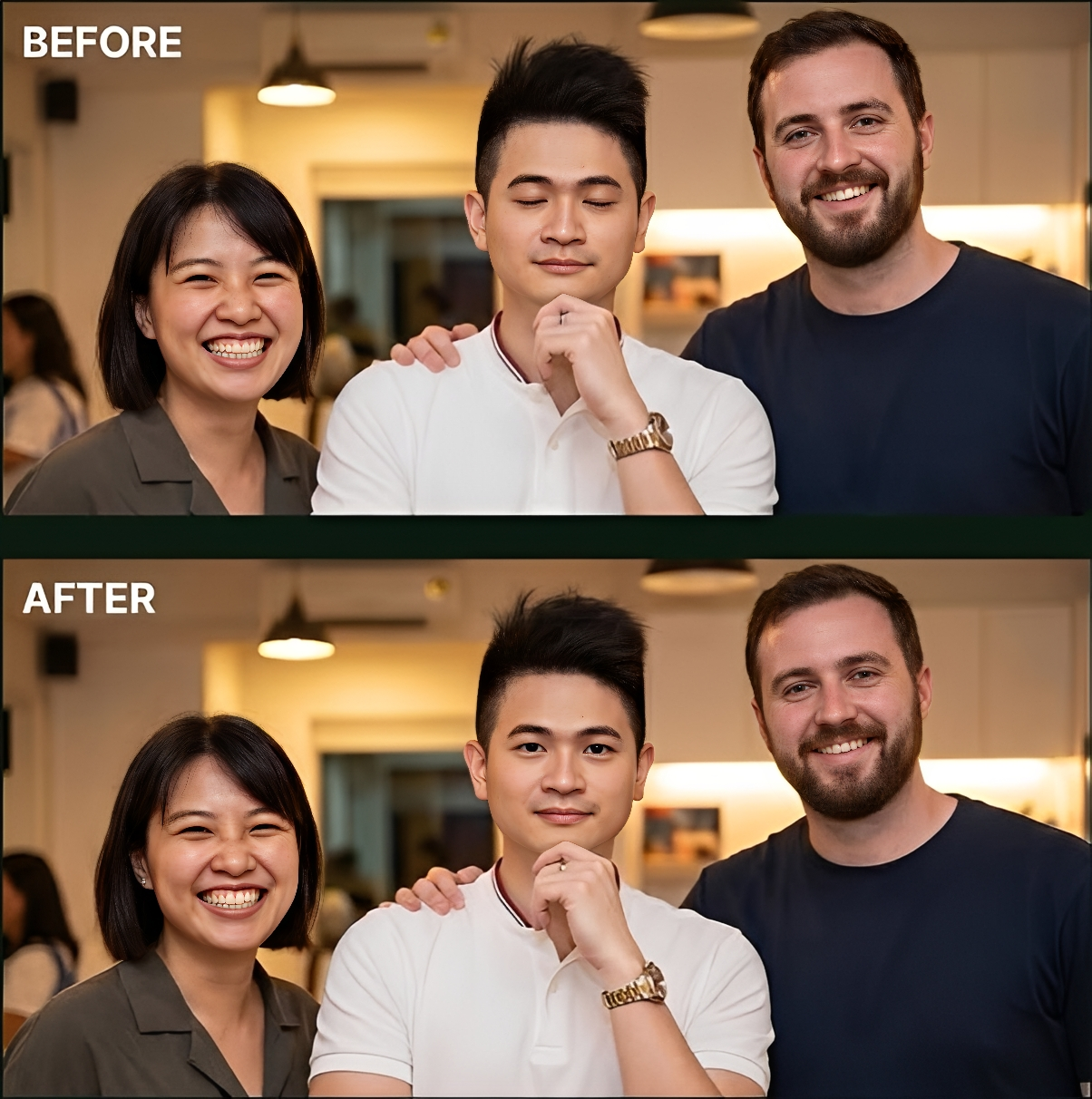
Ultra Realistic Closed Eyes Into Open Eyes Image Prompt
Generate on ChatGPTMain Prompt
How To Use
- Open ChatGPT
- Upload reference image if needed
- Copy the prompt
- Paste the prompt into ChatGPT
- Generate your AI image/video
Description
Photo editing has evolved significantly with the rise of artificial intelligence, allowing creators to transform images in ways that once required advanced retouching skills. One of the most popular editing trends currently gaining attention is the Closed Eyes Into Open Eyes effect. This technique focuses on correcting photographs where the subject accidentally blinked during the shot, resulting in closed or partially closed eyes that reduce the overall quality of the image. The Ultra Realistic Closed Eyes Into Open Eyes Prompt is designed to solve this problem while maintaining a natural and realistic appearance.
A great portrait often depends on facial expression and eye contact. Eyes play a crucial role in communicating emotion, personality, and connection. Even an otherwise perfect photograph can lose its impact if the subject's eyes are closed. Traditionally, photographers had to take multiple shots to avoid blinking issues or spend significant time manually editing images. Modern AI technology now makes it possible to reconstruct natural-looking open eyes while preserving the original character and identity of the subject.
What makes this style particularly impressive is its emphasis on realism. Rather than creating artificial or exaggerated eyes, the goal is to generate results that appear completely natural. Proper eye shape, realistic reflections, accurate iris details, natural eyelid positioning, and balanced lighting all contribute to the final result. When executed correctly, viewers often cannot tell that the image has been edited.
This editing style is especially useful for portrait photography, family photos, wedding albums, social-media content, professional headshots, travel photography, and group pictures. In situations where retaking the photo is impossible, AI-powered eye correction can save valuable memories and improve the overall quality of the image. It has become increasingly popular among photographers, content creators, influencers, and everyday users who want to rescue otherwise perfect photographs.
Another advantage of this technique is its versatility. The same approach can be applied to children blinking during family photos, professional portraits requiring a polished appearance, casual smartphone photographs, and even older images that need restoration. By maintaining realistic skin textures, facial expressions, lighting consistency, and natural eye details, creators can achieve highly convincing results without sacrificing authenticity.
As AI image editing continues to improve, realistic eye correction is becoming one of the most practical applications of modern photo enhancement technology. When natural facial features, realistic eye rendering, balanced lighting, and careful attention to detail are combined successfully, the final image can look as though the subject's eyes were open from the moment the photograph was originally captured.
Best Free AI Tool
- Gemini
Alternative AI Tools
- Google Gemini Adobe Firefly Photoshop Generative Fill Leonardo AI Flux Canva AI Fotor AI SnapEdit
Tips For Better Results
- Use a high-resolution source image for maximum detail.
- Ensure the face is clearly visible in the original photo.
- Maintain the subject's natural eye shape and proportions.
- Preserve realistic lighting and reflections in the eyes.
- Match eye color accurately to the original subject.
- Avoid over-editing that creates an artificial appearance.
- Keep skin textures and facial features unchanged.
- Use realistic eyelashes and eyelid positioning.
- Maintain consistent shadows around the eyes.
- Focus on natural-looking results rather than dramatic enhancements.
Tags
#Ultra Realistic Closed Eyes Into Open Eyes #Eye Correction AI #Open Eyes Photo Editing #Blink Fix Image Prompt #AI Face Enhancement #Portrait Photo Correction #Realistic Eye Editing #AI Photo Retouching #Eye Opening Effect #Professional Portrait Editing #Photo Restoration AI #Face Enhancement Prompt #Realistic Portrait Correction #AI Image Editing Prompt #Trending Photo Editing Prompt #Open Eyes Generator #Portrait Enhancement AI #AI Retouching Prompt #Facial Feature Correction #Realistic Photo Enhancement