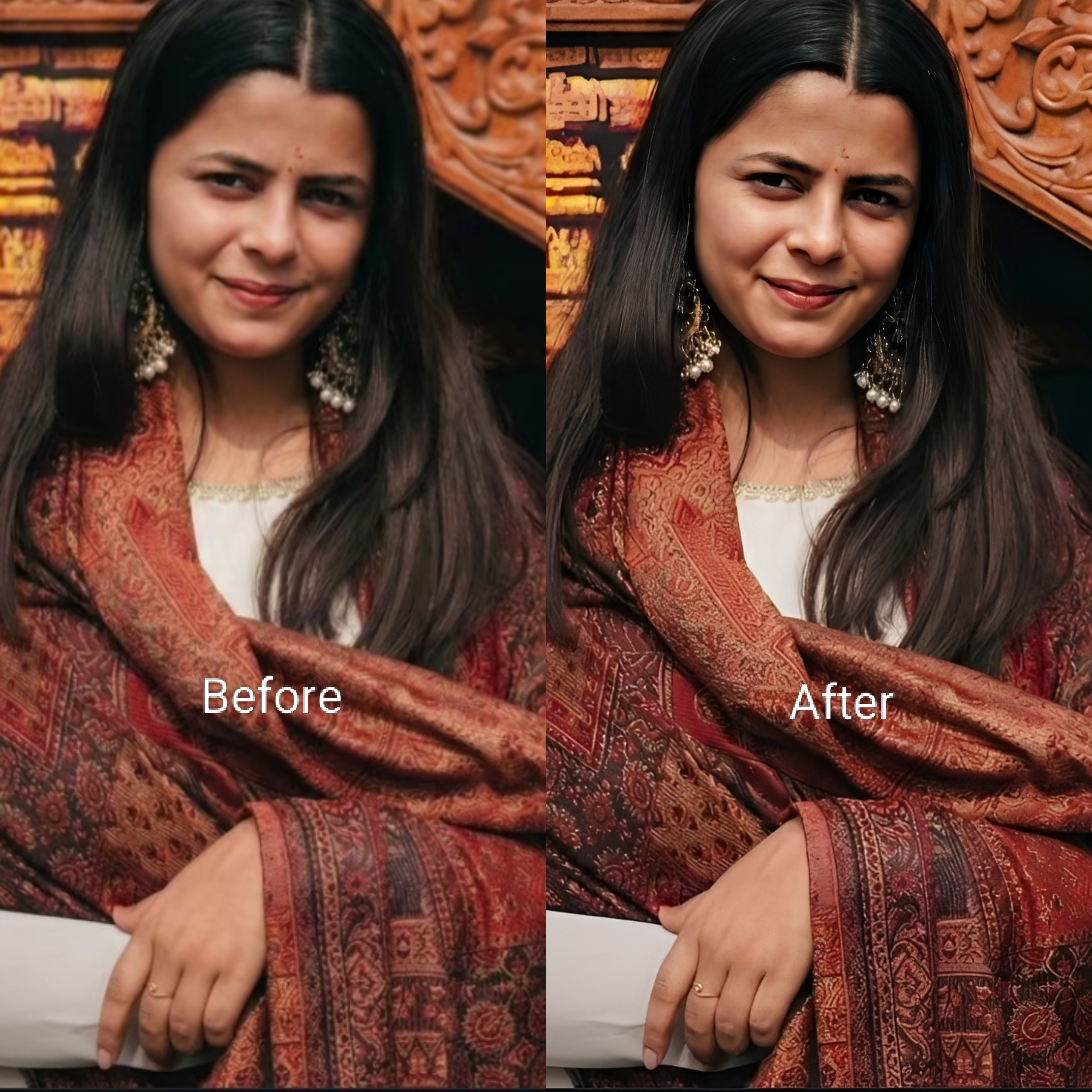
Enhance Potrait Ultra Realistic Image Prompt
Generate on ChatGPTMain Prompt
How To Use
- Open ChatGPT
- Upload reference image if needed
- Copy the prompt
- Paste the prompt into ChatGPT
- Generate your AI image/video
Description
Portrait photography has always been one of the most powerful forms of visual storytelling. A great portrait does more than simply capture a person's appearance—it communicates personality, emotion, confidence, and character within a single frame. However, not every portrait achieves its full potential directly from the camera. Lighting issues, lack of detail, low resolution, poor color balance, skin imperfections, and environmental distractions can prevent an image from reaching professional standards. The Enhance Portrait Ultra Realistic Image Prompt is designed to solve these challenges by transforming ordinary portraits into highly refined, realistic, and visually striking photographs.
What makes portrait enhancement so valuable is its ability to improve image quality while preserving authenticity. The goal is not to create an artificial version of the subject but rather to reveal the best possible version of the original photograph. Modern enhancement techniques focus on improving facial clarity, skin texture, lighting quality, color grading, depth, sharpness, and overall visual balance without compromising the person's natural appearance. When performed correctly, the final image looks professionally captured rather than heavily edited.
One of the biggest reasons ultra-realistic portrait enhancement has become increasingly popular is the growing importance of digital identity. Social-media profiles, professional portfolios, personal branding campaigns, business headshots, influencer content, and online marketing materials all rely heavily on high-quality portraits. In a world where first impressions are often formed through images, visual quality plays a significant role in how people are perceived.
Lighting enhancement is one of the most transformative aspects of this style. Soft natural light can be refined to create warmth and elegance, while dramatic studio lighting can be enhanced to create cinematic depth and visual impact. Shadows can be balanced, highlights can be controlled, and facial features can be emphasized without losing realism. These improvements help create portraits that feel polished while maintaining a natural appearance.
Another key element of portrait enhancement is detail restoration. AI-powered enhancement systems can improve image sharpness, recover fine textures, refine eyes, improve hair detail, and increase overall image resolution. This is especially useful for older photographs, low-quality smartphone images, compressed social-media pictures, and portraits captured in less-than-ideal conditions. The result is a cleaner, more professional image with significantly improved visual quality.
Modern AI image technology has dramatically expanded the possibilities of portrait enhancement. Realistic skin rendering, facial preservation, intelligent sharpening, color correction, and advanced lighting adjustments can now be achieved with remarkable accuracy. These technologies allow photographers, creators, influencers, businesses, and everyday users to achieve results that once required extensive professional retouching.
The success of an enhanced portrait ultimately depends on balance. Over-editing can make an image appear artificial, while subtle improvements often create the most impressive results. Maintaining realistic skin textures, authentic facial expressions, natural eye details, and proper lighting consistency ensures that the final image feels believable and professional.
When realistic enhancement, facial preservation, premium lighting, advanced detail recovery, and professional color grading are combined successfully, the final result can resemble a high-end editorial portrait, luxury magazine photograph, professional studio headshot, or premium branding image while still looking completely natural.
Best Free AI Tool
- Gemini
Alternative AI Tools
- Google Gemini Adobe Firefly Photoshop Generative Fill Leonardo AI Flux Canva AI Fotor AI SnapEdit
Tips For Better Results
- Use the highest-resolution source image available.
- Preserve natural skin textures rather than excessive smoothing.
- Enhance facial details while maintaining realism.
- Improve eye clarity and natural reflections.
- Balance highlights and shadows carefully.
- Use realistic color correction and skin tones.
- Maintain consistent lighting across the portrait.
- Refine hair details and edge definition.
- Avoid over-sharpening facial features.
- Focus on natural enhancement rather than dramatic transformation.
Tags
#Enhance Portrait Ultra Realistic Image #Portrait Enhancement AI #AI Portrait Retouching #Realistic Portrait Editing #Professional Portrait Enhancement #Face Enhancement Prompt #AI Photo Improvement #Ultra Realistic Portrait #Portrait Quality Upgrade #AI Headshot Enhancement #Realistic Face Editing #Portrait Restoration AI #Professional Photo Retouching #Facial Detail Enhancement #High Resolution Portrait AI #AI Beauty Enhancement #Portrait Photography Prompt #Trending AI Editing Prompt #Premium Portrait Enhancement #Realistic Photo Upgrade