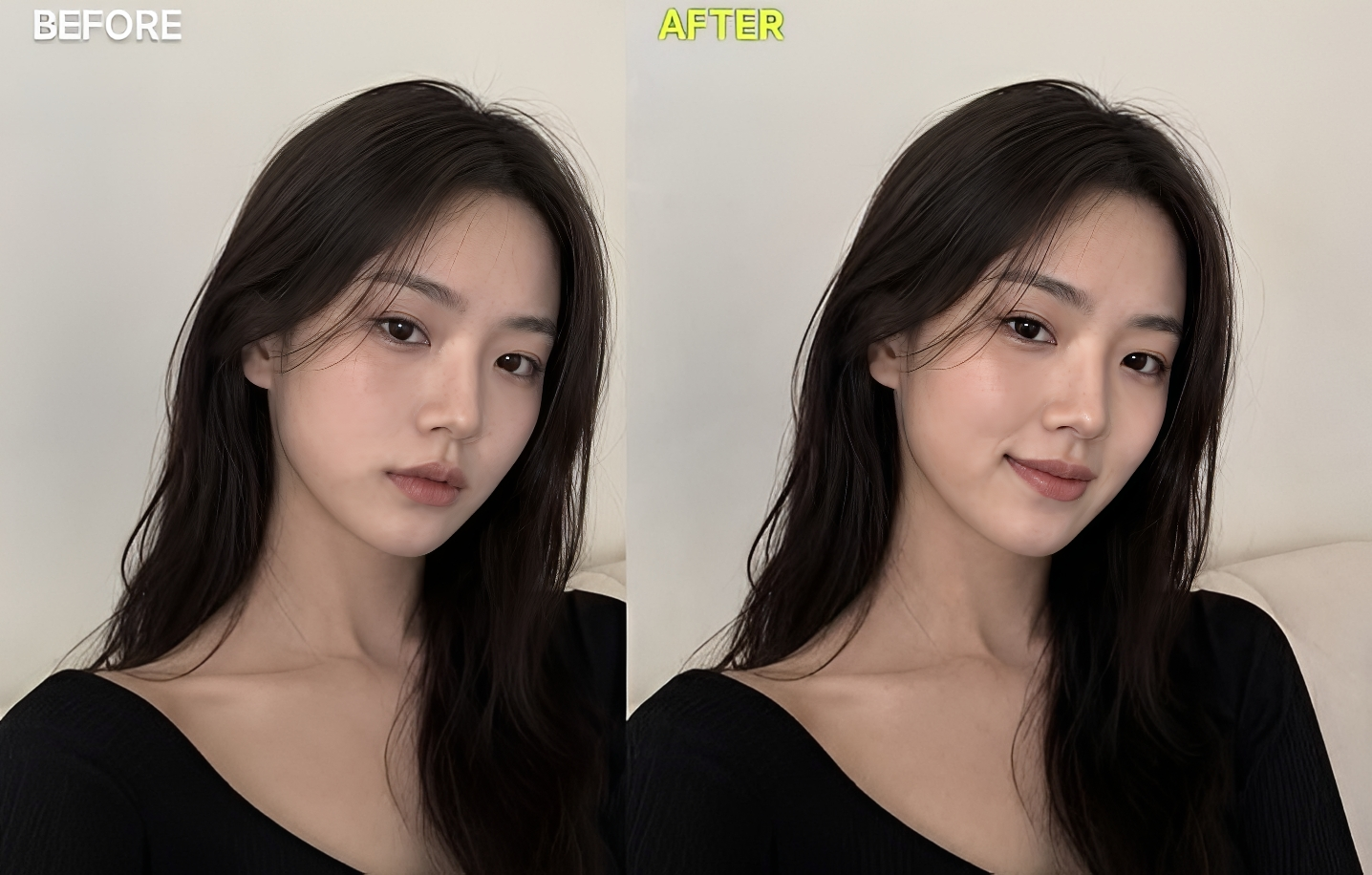
Change Facial Expression Image Prompt
Generate on ChatGPTMain Prompt
How To Use
- Open ChatGPT
- Upload reference image if needed
- Copy the prompt
- Paste the prompt into ChatGPT
- Generate your AI image/video
Description
Facial expressions are one of the most powerful forms of non-verbal communication. A simple smile can create warmth and friendliness, while a serious expression can communicate confidence, determination, or mystery. Because facial expressions play such a significant role in how people perceive photographs, even a small change can dramatically alter the mood and impact of an image. The Change Facial Expression Image Prompt is designed to transform emotions and expressions while preserving the subject's identity, facial structure, and overall realism.
Traditionally, changing a facial expression required retaking a photograph or performing detailed manual edits using advanced photo-editing software. Modern AI technology has revolutionized this process by making it possible to modify expressions intelligently while maintaining natural-looking results. Whether transforming a neutral face into a smile, changing a serious expression into a joyful one, or creating a more confident and engaging appearance, AI-powered facial editing offers remarkable flexibility.
One of the reasons this editing style has become increasingly popular is its practical value. Many photographs are technically perfect but fail to achieve their full potential because the expression does not match the intended mood. A portrait may appear too serious for social media, too neutral for a marketing campaign, or too emotional for a professional profile picture. Facial-expression transformation allows creators to adapt images to different purposes without requiring additional photography sessions.
What makes this style particularly impressive is the emphasis on realism. Successful facial-expression editing involves much more than adjusting the mouth. Realistic changes require coordinated modifications to the eyes, eyebrows, cheeks, jawline, and subtle facial muscles. Natural lighting, skin textures, shadows, and reflections must remain consistent throughout the transformation. When executed correctly, the edited image appears completely authentic, as though the subject originally displayed that expression during the photoshoot.
This style is widely used in portrait photography, social-media content, professional headshots, family photos, marketing materials, influencer content, and creative design projects. Photographers use it to rescue otherwise perfect images, while content creators use it to experiment with different moods and emotional tones. Businesses also benefit from expression editing when creating branding materials that require specific emotional messaging.
Another advantage of facial-expression transformation is emotional storytelling. Different expressions create entirely different viewer responses. A smile may communicate approachability, a thoughtful expression can suggest intelligence, and a confident look can project authority. By adjusting facial emotions while maintaining realism, creators gain greater control over the visual narrative of an image.
As AI image editing technology continues to advance, facial-expression transformation has become one of the most practical and visually impressive applications of modern photo enhancement. When realistic facial anatomy, accurate emotional expression, natural lighting, and identity preservation are combined successfully, the final result can look indistinguishable from an original photograph captured at the perfect moment.
Best Free AI Tool
- Gemini
Alternative AI Tools
- Google Gemini Adobe Firefly Photoshop Generative Fill Leonardo AI Flux Canva AI Fotor AI SnapEdit
Tips For Better Results
- Use a high-resolution portrait image with a clearly visible face.
- Preserve facial identity while modifying only the expression.
- Ensure the eyes, eyebrows, and mouth change naturally together.
- Maintain realistic skin textures and facial details.
- Keep lighting and shadows consistent with the original image.
- Choose expressions that match the context of the photo.
- Avoid extreme emotional changes if maximum realism is desired.
- Preserve natural eye reflections and facial proportions.
- Use subtle adjustments for professional-looking results.
- Focus on believable emotions rather than exaggerated expressions.
Tags
#Change Facial Expression Image Prompt #Facial Expression AI #Expression Change Photo Edit #AI Face Editing #Smile Generator AI #Face Emotion Transformation #Portrait Expression Editing #Realistic Face Enhancement #AI Portrait Editing #Facial Emotion Generator #Expression Correction AI #Face Retouching Prompt #Realistic Facial Editing #AI Photo Manipulation #Portrait Enhancement Prompt #Emotional Expression AI #Face Transformation Prompt #Trending AI Editing Prompt #Professional Portrait Editing #Realistic Expression Change